 Chatdex
Search all your ChatGPT, Claude and Gemini chats in one place
Chatdex is a free Chrome extension that indexes your conversations with ChatGPT, Claude and Gemini on your own device, so you can search them all from one search box and jump back to the exact message. No account, no servers, no tracking.
For desktop Chrome 116 or later. Works on chatgpt.com, claude.ai and gemini.google.com.
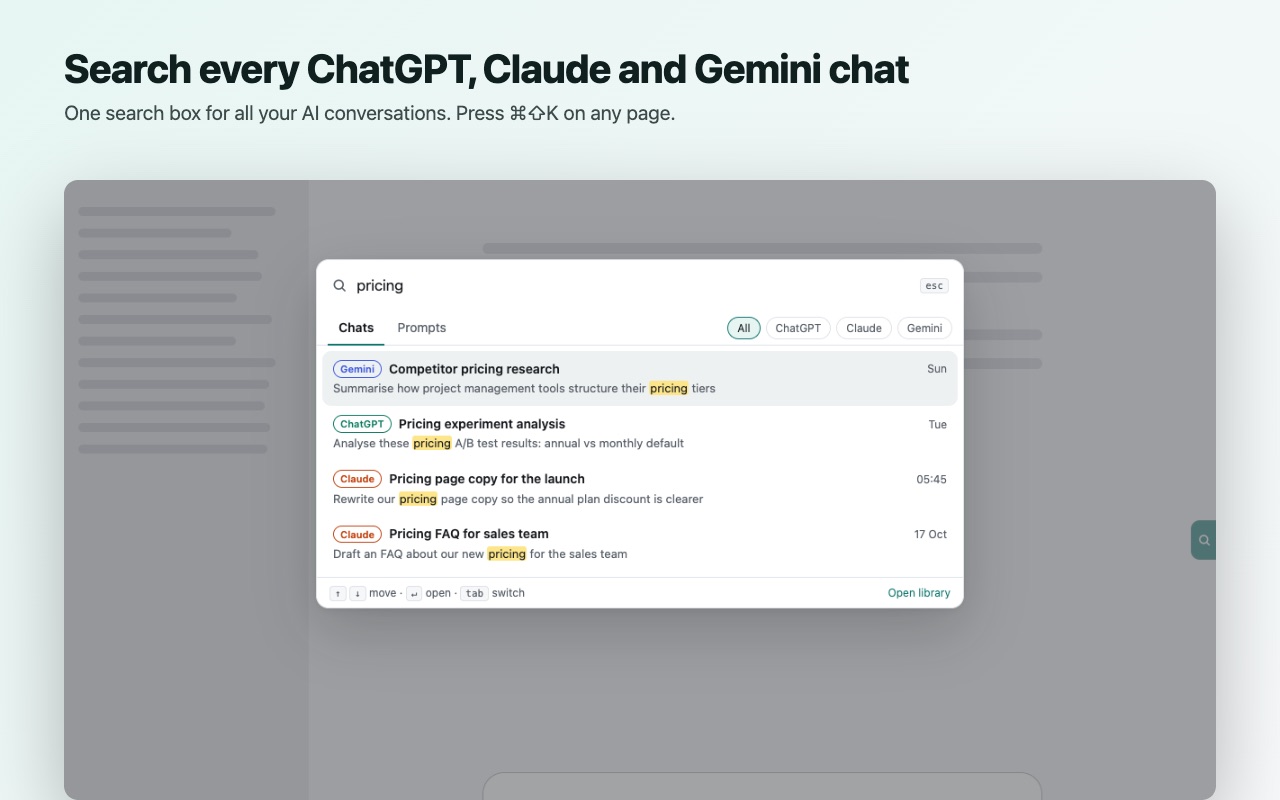
The problem: good answers get lost
If you use AI assistants every day, you build up hundreds of conversations. The useful ones end up buried: a working SQL query, a well-phrased email, an explanation you want to reread. Each assistant has its own sidebar and its own search, and none of them can search the others. If you use more than one assistant, you first have to remember where you asked.
Chatdex keeps one local index of all three, so a single search covers everything.
How it works
Install and choose your sites
Add Chatdex to Chrome. On the welcome page, tick the assistants you want indexed. Nothing is read on a site until you tick it.
Use your assistants as usual
Chatdex indexes each chat you open. For ChatGPT and Claude you can also import your past conversations in the background.
Search from anywhere
Press Ctrl+Shift+K (Windows, Linux) or Cmd+Shift+K (Mac), use the toolbar icon, or click the search tab on the page edge. Type a few words and open the result.
Features
Search all three assistants at once
Full-text search across ChatGPT, Claude and Gemini, with prefix matching and tolerance for typos. Filter by assistant. Recent chats rank higher.
Jump straight to the answer
Each result shows a snippet with your search words highlighted. Open it and Chatdex takes you to the conversation, scrolls to the matching text and outlines it.
Topics, folders and pins
Chats are grouped into topics automatically, using keywords worked out on your device. Add folders and pins if you want them. Organising is optional.
Prompt library
Save prompts, including straight from the message box. Add tags and
{{variables}}that you fill in before inserting. Insert into ChatGPT, Claude or Gemini with one key press.Share prompts with a link
Share one prompt or a whole set as a link. The prompts travel inside the link itself, so no server or account is involved.
Export to Markdown
Export any conversation or group of conversations to Markdown, or save a full backup as a JSON file.
Read more: ChatGPT history search, Claude chat search, Gemini chat history and the prompt library.
Private by design
- Your conversations, prompts, folders and search index are stored in your browser on your device.
- Chatdex has no servers. There are no analytics, no telemetry and no ads, and your data is never sold or used to train AI models.
- The only network requests Chatdex makes are to the AI site you are using, with your existing login.
- Each site is opt-in, and you can turn a site off and delete its stored data at any time.
Frequently asked questions
What does Chatdex do?
Chatdex is a free Chrome extension that keeps a searchable copy of your ChatGPT, Claude and Gemini conversations in your browser. You can search all three at once, organise chats into topics and folders, keep a prompt library and export conversations to Markdown.
Is Chatdex free?
Yes. Chatdex is free to install and use, and it does not need an account or sign-up.
Where are my conversations stored?
On your own device, in your browser’s storage for the extension. Chatdex has no servers, so your conversations are never uploaded anywhere. See the privacy policy for details.
Can it find chats I had before I installed it?
For ChatGPT and Claude, yes, if you turn on the optional history import. Chatdex then reads your past conversations from the site in your own logged-in tab. Gemini history import is not available yet: Gemini chats are indexed when you open them, and chat titles from the Gemini sidebar are indexed so you can find them by title.
Does Chatdex read every website I visit?
No. It only works on chatgpt.com, chat.openai.com, claude.ai and gemini.google.com, and on each of those only after you switch that site on. It also runs on Chatdex’s own share pages so it can add prompts that someone shared with you.
How do I open the search?
Press Ctrl+Shift+K (Windows, Linux) or Cmd+Shift+K (Mac), click the Chatdex icon in the Chrome toolbar to open the side panel, or click the small search tab on the right edge of ChatGPT, Claude or Gemini.
Which browsers does it work in?
Chatdex is built for desktop Chrome, version 116 or later. Other Chromium-based browsers that can install extensions from the Chrome Web Store may also work, but Chrome is the browser it is tested for.
Install Chatdex
Chatdex is a free Chrome extension. No account, no sign-up. Your chats and prompts stay in your browser.